Every story carries two kinds of feedback: quick thumbs on the content and written comments below it. Both are open to readers, both are moderated, and both have a Report path for the rare case something crosses a line.This guide covers where comments live, what you can do with your own, how the rating tallies work, and what actually happens after you hit report.
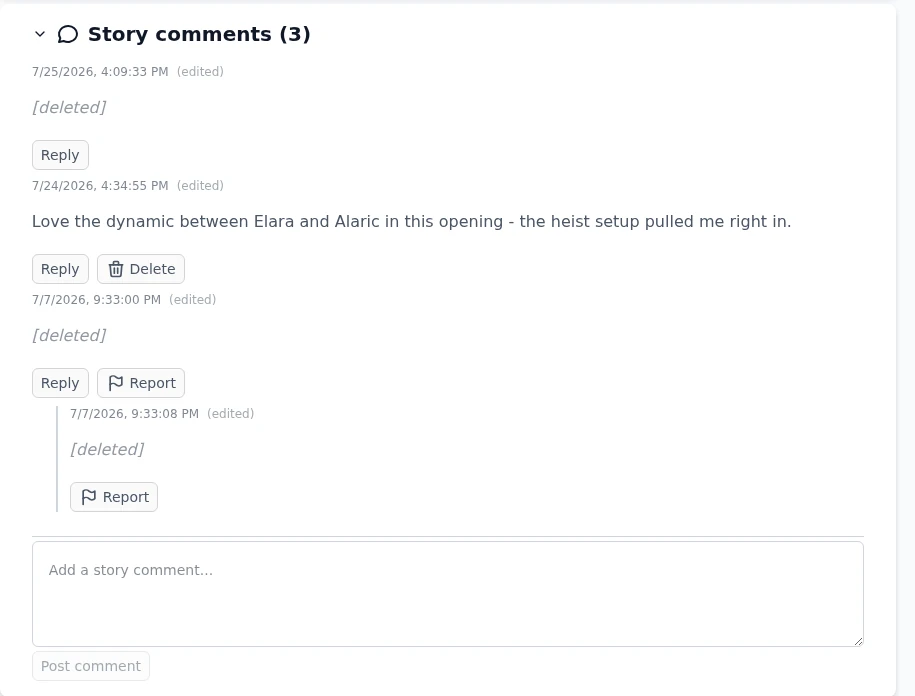
There are two threads per story. Story comments sit on the overview page, below the chapter text. Chapter comments sit under each chapter and stay scoped to exactly that chapter. Both start collapsed as their own header with a count; click that header to expand. Reading comments works without an account, writing needs a login.One thread, all states: a live comment, deleted placeholders, Report on other people's posts, and the comment box at the bottom.
If comment sections distract you, basic settings can keep them collapsed, always open, hidden on phones or hidden everywhere. That setting never changes the story, and signed in it follows your account to your other devices. The same comment rules apply on the community wishlist .
Posting, replying, editing, deleting
A comment is up to 2000 characters. Reply starts a nested answer under a top-level comment, shown with an indented rail. Your own fresh comments carry an Edit button for 15 minutes after posting, with a tooltip counting the minutes down. Once the window closes, the button disappears and the text stands.Your own comment: Reply and Delete always, Edit during the first 15 minutes, and an (edited) marker after changes.Delete is always available on your own comments, and story owners can additionally delete any comment on their story. Deleting does not silently close gaps in a conversation: the comment's text is replaced with a [deleted] placeholder so replies below it keep their context.
As a story owner you can also switch comments off entirely with the Enable comments toggle next to the visibility control, covered in sharing & collaboration .
Ratings: thumbs and tallies
Below each chapter sit two thumbs. Tap to rate up or down, tap the same thumb again to take the rating back. Guests can vote without an account. The small score next to the thumbs splits into two tallies, one for logged-in members and one for guests, so you can see who liked what.Thumbs below the chapter text. The tally splits member and guest votes.Creators cannot vote on their own chapters, and the server enforces that even if a button were to slip through. The same self-vote block applies to every rateable thing in the app, short stories and shared characters included. The reading-side details, including hiding the vote buttons per device, live in reading & choices .
Reporting a comment
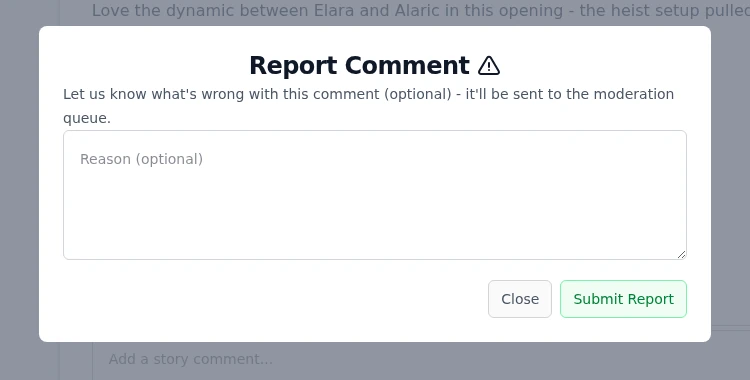
Every comment that is not your own carries a Report button. It opens a small dialog with an optional reason field. Submitting sends the comment to the moderation queue, where an admin reviews it and decides whether it stays or goes.A reason helps the review, but it is optional. Nothing is public about a report.Comments also pass an automatic content check when posted. A comment the check flags as explicit is hidden for everyone except its author, who sees a Hidden pending review note until a moderator confirms or clears it.
Copyright reports are different
Story pages also show a Report Copyright Infringement button. That one is a formal copyright claim with legal weight, a different beast from reporting a rude comment. It asks for your identity, the work you own and sworn statements, and it immediately affects the reported story. Read copyright & public-domain stories before using it.
Use comment Report for tone, spam and abuse. Use the copyright button only when your own protected work has been copied.
Best practices
Comment on the chapter when your feedback is about one scene, and on the story when it is about the whole. Future readers find it where they expect it.
Reread your comment right after posting. The 15-minute edit window is exactly for fixing typos and softening tone.
Delete regret-comments early. The placeholder that remains is far less awkward than the original.
Vote as you read. Tallies steer other readers, and taking a vote back is one tap.
When you report, spend one sentence on the reason. A concrete note beats an empty report in review speed.
Under the hood
Comments are stored per story and per chapter with a 2000 character limit and one level of nesting. Threads load 20 top-level comments per page, with Show more appending further pages.The 15-minute edit window is enforced server-side from the posting time. Deleting is a soft delete: the row stays for thread structure and its text is replaced by a tombstone.Comment reports land in the same review inbox admins use for bug reports, tagged as comment reports, together with the optional reason.The automatic explicit-content check runs on every posted comment and on edits. A flagged comment gets a hidden state that only its author and the moderation queue can see.Member votes are stored per account, guest votes per anonymous client id, and the two are tallied separately. The server rejects self-votes by the creator regardless of what the client sends.